Reach Your CGNAT NAS From a Cloud Server
A step-by-step tutorial: outbound reverse SSH tunnel from a NAS behind CGNAT to a cloud server, with keys both directions and a tunnel that survives reboots.
TL;DR
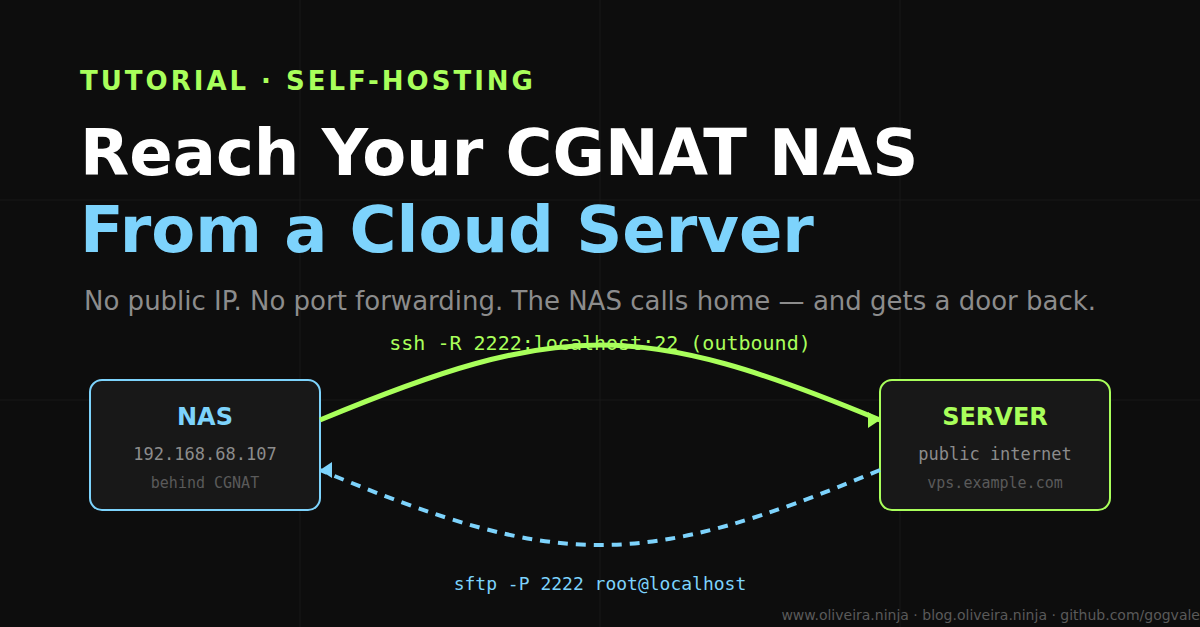
- A NAS behind CGNAT has no public IP, so the cloud server cannot reach it. Reverse the direction: the NAS dials out, the server gets a door back.
- One
ssh -Rline, two firmware quirks fixed with ased, one keep-alive script — and files move from the server to the NAS over SFTP like it was a local disk.- Cost: zero. Inbound ports opened: zero.
Why
Port forwarding is not difficult on my NAS. It is impossible.
The box sits behind CGNAT, the thing ISPs use when they ran out of IPv4 addresses. No public IP, ever. Carrier-grade NAT means the port does not exist, so forwarding to it is theater — nothing on the internet can knock on a door this box does not have.
And I needed files to land on it. My cloud server sits on the public internet with a real address and a pile of things that belong on the NAS, not on my laptop: an open film from the Internet Archive, a CC-licensed short, the occasional download.
The classic answers all annoyed me. VPN clients on a firmware-locked NAS: fragile. DynDNS: does not fix CGNAT.
Then I stopped trying to reach the NAS. I let the NAS reach me. That one reversal is the whole trick.
What you need
- A NAS with SSH enabled (any brand works; I use a WD My Cloud EX2 Ultra on OS5)
- A cloud server with key-only SSH (mine is a DigitalOcean droplet)
- Ten minutes
Step 1 — SSH in, and fix the two things WD hides
Enable SSH from the NAS dashboard and log in. Then the firmware shows its personality.
Quirk one: root’s home is /home/root, not /root. SSH looks for keys in $HOME/.ssh. Put them in the place the box checks:
1
2
3
mkdir -p /home/root/.ssh && chmod 700 /home/root/.ssh
ssh-keygen -t ed25519 -N "" -f /home/root/.ssh/id_ed25519
cat /home/root/.ssh/id_ed25519.pub   # → authorized_keys on the server
Quirk two: the stock sshd only allows the internal sshd user. My first root login worked; my first automated connection did not. One line fixes it:
1
2
sed -i 's/^AllowUsers sshd/AllowUsers root sshd/' /etc/ssh/sshd_config
killall -HUP sshd
Add the server’s public key to /home/root/.ssh/authorized_keys on the NAS so transfers never ask for a password.
Step 2 — Open the tunnel, backwards
From the NAS, dial out to the server. localhost:2222 on the server now behaves like port 22 on the NAS:
1
ssh -N -R 2222:localhost:22 hermes@vps.example.com
That one line is the whole trick. The connection is outbound, so no router, no firewall rule, no public IP — the tunnel rides on the connection the NAS already made.
A tunnel dies with the terminal, so run it as a loop that reconnects and survives logout:
1
2
3
4
5
6
7
8
9
10
11
cat > /home/root/keep_tunnel.sh <<'EOF'
#!/bin/sh
while true; do
  ssh -o ServerAliveInterval=30 -o ServerAliveCountMax=3 \
      -o ExitOnForwardFailure=yes -N -R 2222:localhost:22 hermes@vps.example.com
  sleep 10
done
EOF
chmod +x /home/root/keep_tunnel.sh
nohup /home/root/keep_tunnel.sh >/dev/null 2>&1 &
echo "@reboot /home/root/keep_tunnel.sh >/dev/null 2>&1 &" | crontab -
ServerAliveInterval keeps the connection honest. ExitOnForwardFailure refuses to sit there pretending the forward works when it does not. nohup survives you closing the laptop; the @reboot line brings it back after the NAS restarts.
Step 3 — Move a file
From the server, the NAS is one hop away:
1
2
sftp -P 2222 root@localhost
put "film.mp4" /mnt/HD/HD_a2/Peliculas/
First try: file lands, checksum matches, done. The NAS still thinks it is a local appliance. The server treats it like a remote disk it owns.
What you end up with
A NAS that accepts files from the internet without a single inbound port being open anywhere. The appliance never learns it is reachable from outside — because it is not. It is the one who calls home, and home answers on the other side of a door only the NAS can open.
The whole thing cost nothing but two config lines and a habit of reading sshd_config before blaming the router. If you want the industrial version of the keep-alive, autossh supervises the same loop.
If your needs grow past one machine, Tailscale is the mesh version of the same idea — I kept the tunnel because the NAS should not run more software than it already does.